Godot Flat UI
A downloadable asset pack
Flat UI Kit
A flat, no-gradient UI kit for Godot 4.6 — built from tokens, not tweaked by hand.
One flat fill per surface, four ground layers (ink → screen → panel → chip), and six saturated accent colors that each own a single job — no gradients, no bevels, no inset shadows. Every button, bar, tile, and banner reads from the same small set of design tokens, so your whole UI stays visually consistent without redrawing anything twice.
What's inside
- Buttons — 4 states (default / hover / active / disabled) across 6 color variants, all driven by one flat rule set.
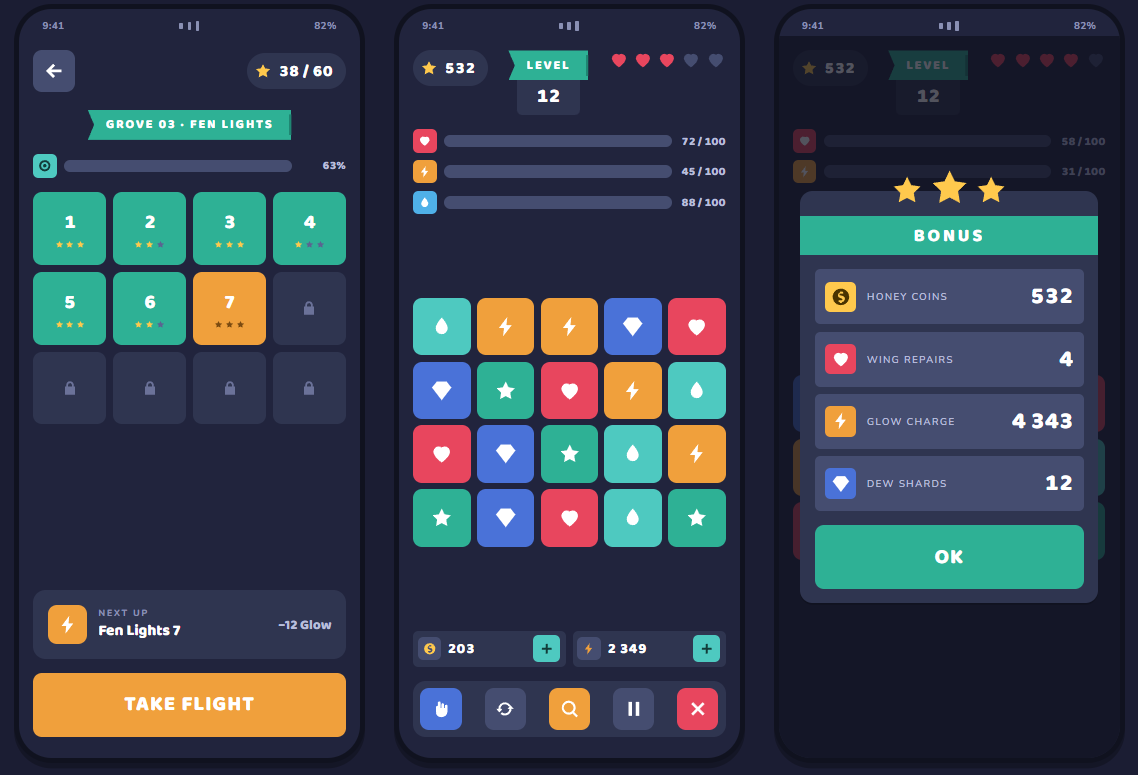
- Ribbons — notched level/status banners (think "LEVEL 12", "NEW RECORD") built as clean vector shapes, not sliced images — resize them to any width and the fold never breaks.
- Resource bars — health/mana/XP-style bars with 3 fill levels, icon chip included.
- Score pills, tags, tabs, switches, text inputs — the small stuff every HUD and menu needs.
- Item tiles & level nodes — square art chips with locked/cleared/current states, ready for shops, inventories, and skill trees.
- 25 flat SVG icons — star, heart, coin, gem, chest, trophy, gear, lock, chat, sound, music controls, navigation, and more.
- 3 font families included — Baloo 2, Nunito, and Roboto Mono (all Open Font License).
- A full component sheet scene — every piece shown at once, organized in 11 sections, so you can see exactly what you're getting before you build anything.
How it works
Everything is plain Godot Control scripts — no editor plugin, no build step. Drop the theme resource into your project's default Theme, use the included component scripts directly, or just reference the sheet as a spec while you build your own. One script regenerates the entire Theme resource from a single token file, so re-palette the whole kit by editing a handful of colors.
Good for
Mobile games, casual/idle games, roguelites, and any project that wants a clean, modern, flat HUD without hiring a UI artist — programmer-friendly, consistent by construction.
Download
Install instructions
ownload & Installation
Requires Godot 4.6 (uses @export_tool_button, Godot 4.6+ only).
1. Download
Grab the ZIP from this page and unzip it anywhere — it's a complete, ready-to-open Godot project (not just loose files).
2. Preview the kit
1. Open Godot 4.6, click Import, and select the unzipped folder's project.godot.
2. Open the project — it launches straight into the full component sheet (flat_ui_showcase.tscn), showing every button state, ribbon, bar, tile, and icon at once.
3. Press F5 (or the Play button) any time to re-run the sheet.
3. Add it to your own project
Copy these three folders into your existing Godot project, keeping the same paths:
assets/ui/flat-ui/ ← theme resource, fonts, icons
scripts/ui/flat_ui/ ← the 8 component scripts (FlatUiButton, FlatUiRibbon, ...)
scripts/ui/flat_ui_showcase.gd (optional — only if you want the demo sheet too)
scenes/ui/flat_ui_showcase.tscn (optional — same)
Then either:
- Use it as your project's default theme — Project Settings → GUI → Theme → Custom, point it at assets/ui/flat-ui/flat_ui_theme.tres. Every default Button, Label, Panel, etc. now uses the kit's flat style automatically.
- Apply it selectively — set the theme property on a specific Control (or root of a scene) to flat_ui_theme.tres instead of the whole project.
- Use the components directly — instance FlatUiButton, FlatUiRibbon, FlatUiBarra, etc. from a script (FlatUiRibbon.new()) or drag them in like any other Control-derived class once the scripts are in your project.
4. Customize the palette
Edit the color/spacing constants in scripts/ui/flat_ui/flat_tokens.gd, then regenerate the theme resource:
godot --headless --path . --script res://tools/generate_flat_ui_theme.gd
This rebuilds flat_ui_theme.tres from scratch with your new tokens — every component updates without touching a single .tres file by hand.
Leave a comment
Log in with itch.io to leave a comment.